9 Best Wi-Fi Bird Feeder Cameras (October 2026)
The best Wi-Fi bird feeder cameras include the Bird Buddy Pro Solar Smart Bird Feeder for app-led birdwatchers, the Birdfy Metal 2 4K Smart Bird Feeder for dual-band yards, and the Kiwibit 4K 8MP Solar Bird Feeder for family sharing.
On this page (9 sections)
- How we chose Wi-Fi bird feeder cameras
- Compare Wi-Fi bird feeder cameras
- The best Wi-Fi bird feeder cameras for different setups
- How do you choose a Wi-Fi bird feeder camera?
- What Wi-Fi band should a bird feeder camera use?
- How should you compare app features and storage?
- How do you set up and care for a Wi-Fi bird feeder camera?
- What mistakes should you avoid when buying a Wi-Fi bird feeder camera?
- Which Wi-Fi bird feeder camera should you choose?
The best bird feeder with camera Wi-Fi for most people is Bird Buddy Pro Solar, a 2.4 GHz feeder with 2K video, an included solar roof and app features for watching bird visits. If you need 5 GHz Wi-Fi, want 4K live viewing or need local card storage, choose from the other models below based on those priorities.
A camera feeder works best when its network, power source and recording options fit the actual spot in your yard. Confirm your router bands and signal before buying, then decide whether you need saved clips, bird identification or a live feed.
For a wider look at camera styles, browse our smart bird feeder recommendations. Our guide to whether smart bird feeders need Wi-Fi explains what the network connection lets you do.
Our picks at a glance
-
1
 Best for app-led birdwatchers
Bird Buddy Pro Solar Smart Bird Feeder
8.6/10 our score
See it on Amazon -
2

-
3

- 4
 Check it
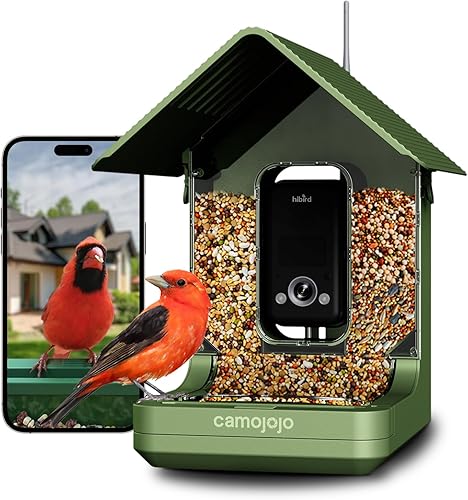
Hibird 4K Dual-Band Bird Feeder
Best for battery-powered dual-band - 5
 Check it
SV3C 4K Solar Bird Feeder With 32GB Card
Best for included card storage - 6
 Check it
Kiwibit 2 Pro Solar Bird Feeder With Camera
Best for slow-motion bird clips - 7
 Check it
Hibird Pro 4K Dual-Band Bird Feeder
Best for solar slow-motion viewing - 8Check it
WingHome 4K Dual-Band Bird Feeder Camera
Best for flexible solar mounting - 9
 Check it
TOP XIAN 2K Dual-Band Window Bird Feeder
Best for indoor window watching
How we chose Wi-Fi bird feeder cameras
We compared each camera's stated Wi-Fi bands, video modes, power options and storage features. Those details determine whether a camera will connect at your planned spot, stay powered in that location and save the moments you want to revisit.
Dual-band support is useful if your router offers both 2.4 and 5 GHz, but it does not promise a strong signal through walls or across a yard. A 2.4 GHz-only camera can be a good choice when that network reaches the feeder.
We also considered whether the key app features are free or require a subscription, and whether the camera provides local or cloud storage. Our scores reflect how well those features match the needs of someone shopping for a camera feeder.
Compare Wi-Fi bird feeder cameras
The main differences are Wi-Fi band, live-view resolution and how clips are saved. Compare those first, then weigh solar charging, mounting style and app features against your yard and viewing habits.
| Product | Best for | Wi-Fi | Video | Storage | Our score |
|---|---|---|---|---|---|
| Bird Buddy Pro Solar Smart Bird Feeder | app-led birdwatchers | 2.4 GHz | 2K; 5MP photos | App sharing; no card detail given | 8.6 |
| Birdfy Metal 2 4K Smart Bird Feeder | dual-band yards | 2.4 and 5 GHz | 4K; dual night vision | 24/7 recording described; card details not given | 8.0 |
| Kiwibit 4K 8MP Solar Bird Feeder | family sharing | 2.4 GHz; no 5 GHz | 4K live streaming | MicroSD up to 512GB; 1-day rolling cloud history | 7.6 |
| Hibird 4K Dual-Band Bird Feeder | battery-powered dual-band | 2.4 and 5 GHz | 4K recording; 1080p live view | Replaceable card up to 128GB | 7.4 |
| SV3C 4K Solar Bird Feeder With 32GB Card | included card storage | 2.4 and 5 GHz | 4K UHD | 32GB card included; supports up to 128GB | 7.1 |
| Kiwibit 2 Pro Solar Bird Feeder With Camera | slow-motion bird clips | 2.4 and 5 GHz | 4K HDR; slow motion up to 8x | Included microSD card; capacity not given | 7.0 |
| Hibird Pro 4K Dual-Band Bird Feeder | solar slow-motion viewing | 2.4 and 5 GHz | 4K recording; 1080p live view | Not specified | 7.0 |
| WingHome 4K Dual-Band Bird Feeder Camera | flexible solar mounting | 2.4 and 5 GHz | 4K UHD | Not specified | 6.8 |
| TOP XIAN 2K Dual-Band Window Bird Feeder | indoor window watching | 2.4 and 5 GHz | 2K live view | Free 3-day cloud storage | 6.7 |
The best Wi-Fi bird feeder cameras for different setups
The right model depends on your router, the feeder's distance from the house and what you want to do with the footage. These picks cover app-led birdwatching, dual-band connections, local storage, slow motion and window viewing.
Bird Buddy Pro Solar Smart Bird Feeder: Best for app-led birdwatchers
- 2.4 GHz Wi-Fi
- 2K video and 5MP photos
- Solar roof included
- Core app features remain free
A 2.4 GHz connection and app features for species ID, live streaming and bird postcards suit buyers who want a guided birdwatching experience. Advanced features require a subscription.
Pros
- Solar roof included
- 2K video and HDR
- Core app features are free
Cons
- Requires 2.4 GHz Wi-Fi
- Advanced features require a subscription
Bird Buddy suits birdwatchers who want an app-led experience with live streaming, bird postcards, species identification and sharing. It connects through 2.4 GHz Wi-Fi and pairs through Bluetooth during setup.
The camera records 2K video and 5MP photos with HDR. Its included solar roof can help reduce USB-C charging when the mounting spot gets useful sunlight.
Core app features, including live streaming and species ID, are free. Bird Buddy offers a subscription for advanced features such as personalized collections and wildlife insights, so this is a better fit if the free tools meet your needs.
Choose it if your router's 2.4 GHz band reaches the feeder and you want the app to help organize your bird visits. Skip it if your network only offers 5 GHz.
Birdfy Metal 2 4K Smart Bird Feeder: Best for dual-band yards
- 2.4 and 5 GHz Wi-Fi
- 4K video and night vision
- Metal body
- Free AI bird ID
Dual-band Wi-Fi gives you a choice of network band, while a metal body and solar power suit a permanent outdoor setup. Birdfy says AI bird identification is included without a subscription.
Pros
- Supports 2.4 and 5 GHz
- Solar panel and 9000mAh battery
- Metal body
Cons
- Card storage details not given
- The feeder is heavier than several picks here
Birdfy Metal 2 4K is a good match for a yard where flexible Wi-Fi and a sturdy feeder body matter. It supports 2.4 and 5 GHz Wi-Fi, pairs through Bluetooth and has an external antenna.
Its camera records 4K video and offers both color and infrared night vision. The metal body holds 1.8L of seed, and the feeder has a solar panel with a 9000mAh battery.
Birdfy says its AI identification is included without a subscription. The available storage details describe 24/7 recording but do not specify card capacity or cloud retention, so choose another model if you need a clearly defined way to keep footage.
Pick it if you want dual-band Wi-Fi, free AI identification and a metal feeder. Skip it if a lighter setup is important, since this feeder weighs 6 lb.
Kiwibit 4K 8MP Solar Bird Feeder: Best for family sharing
- 2.4 GHz Wi-Fi
- 4K live streaming
- MicroSD up to 512GB
- Share recorded moments with up to 20 users
The Kiwibit pairs 4K live streaming with local microSD support and broad sharing for recorded moments. Its AI features require a subscription after the 30-day trial.
Pros
- 4K live streaming
- MicroSD support up to 512GB
- Recorded moments can be shared with up to 20 users
Cons
- Does not support 5 GHz Wi-Fi
- Premium AI requires a subscription after the trial
Kiwibit 4K 8MP Solar Bird Feeder fits families who want 4K live viewing and a choice of local or cloud video storage. It uses 2.4 GHz Wi-Fi only, so check that the band is enabled and reaches the installation point.
It supports microSD cards up to 512GB, but a card is not included. The camera also has 1-day rolling cloud history at no additional cost.
You can share recorded moments with up to 20 people, while up to 3 people can watch live at once. FeatherPal AI features have a 30-day trial, then require a subscription.
Choose it when family sharing and local storage matter more than 5 GHz support. For help choosing a card, see our guide to bird feeder camera SD cards.
Hibird 4K Dual-Band Bird Feeder: Best for battery-powered dual-band
- 2.4 and 5 GHz Wi-Fi
- 4K recording
- 1080p live view
- Battery powered
This Hibird model combines dual-band Wi-Fi with a battery-powered setup and supports a replaceable card up to 128GB. Its live view is specified at 1080p, even though recording supports 4K.
Pros
- Supports both Wi-Fi bands
- Replaceable card up to 128GB
- IP66 rating
Cons
- Live view is 1080p
- Battery-powered
This Hibird model suits buyers who want dual-band Wi-Fi and can manage a battery-powered camera. It connects on 2.4 or 5 GHz, records 4K video and provides 1080p remote live view.
You can replace its storage card with one up to 128GB. The 1.5L seed bin and IP66 rating are useful features for an outdoor setup.
Remember that the live view is 1080p, even though recordings support 4K. Choose this camera if you value network flexibility and recorded video resolution; skip it if you want a solar power setup or 4K live viewing.
Our guide to 2K versus 4K bird feeder cameras explains how to compare video modes.
Kiwibit 2 Pro Solar Bird Feeder With Camera: Best for slow-motion bird clips
- 2.4 and 5 GHz Wi-Fi
- 4K HDR and autofocus
- Up to 8x slow motion
- Built-in 5W solar panel
Dual-band Wi-Fi, autofocus and slow-motion recording make this a fit for buyers who want to review quick bird movements. AI identification is part of a 30-day trial, with a subscription required afterward.
Pros
- Supports both Wi-Fi bands
- Autofocus and slow motion
- Built-in solar panel
Cons
- Premium AI requires a subscription after the trial
- Included card capacity not given
Kiwibit 2 Pro is for birdwatchers who want dual-band Wi-Fi and slow-motion views of quick movement. It combines 4K HDR and autofocus with recording options up to 8x slow motion.
The built-in 5W solar panel works with a detachable 5200mAh battery. An included microSD card or cloud storage can hold recordings, though the card capacity is not specified.
Live view, motion alerts, sharing and supported recordings are available without Premium. AI identification and other features require a subscription after the 30-day trial.
Choose it if autofocus and slow motion matter to you, and you want both Wi-Fi bands available. Skip it if free AI identification is a priority or you need to know the included card's capacity before buying.
SV3C 4K Solar Bird Feeder With 32GB Card: Best for included card storage
- 2.4 and 5 GHz Wi-Fi
- 4K video
- 32GB microSD card included
- Free AI identification
An included 32GB microSD card gives you local storage from the start, and the camera supports both Wi-Fi bands. Solar power and a 1.5L seed bin round out its outdoor setup.
Pros
- 32GB microSD card included
- Supports 2.4 and 5 GHz
- Free AI identification
Cons
- No cloud history detail given
- IP65 weather resistance
SV3C is the straightforward choice if you want a memory card in the box and dual-band Wi-Fi. It includes a 32GB microSD card, supports cards up to 128GB and works on 2.4 or 5 GHz.
The camera records 4K UHD video with a 144-degree view. Its solar panel and 5200mAh battery power a feeder with a 1.5L seed bin.
SV3C says AI bird identification is included without a required monthly plan. Weather resistance is rated IP65, so consider how exposed the mounting location will be.
Pick this model if you want local storage ready to use and free AI identification. Skip it if you rely on cloud history, since cloud retention details are not specified.
Hibird Pro 4K Dual-Band Bird Feeder: Best for solar slow-motion viewing
- 2.4 and 5 GHz Wi-Fi
- 4K video
- Up to 6x slow motion
- 5000mAh battery and 5W solar panel
The solar panel and dual-band Wi-Fi suit yards where the feeder can get sunlight and connect on either network band. Its app is described as supporting bird ID and a digital birding log.
Pros
- Supports both Wi-Fi bands
- Solar panel and 5000mAh battery
- Up to 6x slow motion
Cons
- Live view is 1080p
- Storage details not given
Hibird Pro offers solar power, dual-band Wi-Fi and slow-motion recording in one setup. It records 4K video, supports slow motion up to 6x and sends app notifications.
Its 5000mAh battery works with a 5W double solar panel. The feeder holds 1.3L of seed, and its stated weather protection is IP66.
Live streaming is 1080p rather than 4K. Storage and card support are not specified, so this option is less suitable if keeping clips locally is essential.
Choose it if you want solar charging and slow-motion footage. Skip it if you need a clearly specified recording-storage plan before purchase.
WingHome 4K Dual-Band Bird Feeder Camera: Best for flexible solar mounting
- 2.4 and 5 GHz Wi-Fi
- 4K video
- 5000mAh battery and dual solar panels
- AI bird ID
WingHome combines dual-band Wi-Fi with a battery and dual solar panels. Its app supports real-time viewing and alerts, while storage details are not specified.
Pros
- Supports both Wi-Fi bands
- Dual solar panels
- Multiple installation options
Cons
- Storage details not given
- Feeder capacity differs between the title and specs
WingHome combines dual-band Wi-Fi with a battery and two solar panels. Its app supports real-time viewing and arrival alerts, and the camera records 4K video with 6x slow motion.
The camera also offers AI identification for more than 10,000 species. It supports wall, pole and tree mounting, giving you several ways to place the feeder.
Storage details are not specified, and the capacity figures conflict: the title says 1.3L, while the specifications say 1L. Check capacity and how footage is saved before choosing it, especially if refill frequency or saved video matters to you.
Pick it if flexible mounting and solar power are your priorities. Skip it if you want a confirmed feeder capacity or clearly described local storage.
TOP XIAN 2K Dual-Band Window Bird Feeder: Best for indoor window watching
- 2.4 and 5 GHz Wi-Fi
- 2K live view
- 3-day free cloud storage
- Window suction-cup mounting
The window mount brings the camera close to indoor viewing, and the app includes motion alerts and 3-day cloud storage. It supports both Wi-Fi bands and offers solar or USB charging.
Pros
- Window suction-cup mounting
- Supports both Wi-Fi bands
- Free 3-day cloud storage
Cons
- 2K rather than 4K video
- AI features begin with a 30-day trial
TOP XIAN is the window-viewing pick, with a suction-cup mount for placing the feeder close to your indoor viewing spot. It supports 2.4 and 5 GHz Wi-Fi, provides 2K live view and sends motion alerts.
The camera records 10-second cloud videos and includes free 3-day cloud storage. Its battery can charge by USB or the included solar panel, and its detachable tray makes refilling and cleaning easier.
AI bird recognition starts with a 30-day trial. You can also mount the feeder on a wall or tree if a window is not the right location.
Choose it if you want to watch birds through a window and are comfortable with 2K video. Skip it if you want 4K or need local card storage.
See more window bird feeders with cameras.
How do you choose a Wi-Fi bird feeder camera?
Start by checking the Wi-Fi signal and available bands at the exact place you plan to mount the feeder. A model with the wrong band will not connect, and an otherwise compatible camera can still struggle if the signal is weak outdoors.
Next, decide what you want to do with the footage. If you mainly want to watch visits live, prioritize live-view quality and alerts; if you want to save clips, look for a supported microSD card, an included card or a clearly described cloud history.
Then match the power and mount to the site. Solar panels can reduce charging when they get useful sun.
A battery-only camera needs charging access. A window mount, wall mount, pole or tree strap each suits a different placement.
Finally, check app and subscription terms before choosing based on AI features. Some models include identification without a plan, while others offer a trial and then require a subscription for premium AI.
What Wi-Fi band should a bird feeder camera use?
Choose a camera that supports a band available on your router and reaches the feeder location. Bird Buddy and the Kiwibit 4K model in this roundup use 2.4 GHz, while Birdfy, Hibird, SV3C, WingHome and TOP XIAN support both 2.4 and 5 GHz.
Check whether your router broadcasts both bands and whether your phone can connect to the needed network during setup. If pairing fails, bring the camera closer to the router temporarily; this can help you tell a range problem from a band mismatch.
Placement also affects the camera view and mounting options. Our guide to where to put a bird feeder camera covers how to choose a useful spot.
How should you compare app features and storage?
Compare live view, alerts, recording and saved clips as separate features. A camera can provide live video without giving you the same options for keeping or reviewing recordings.
Local microSD storage keeps clips on a card at the feeder, while cloud history lets you access saved clips through an app. Some models offer both, and AI recognition may require a separate subscription.
Before you buy, check whether a card is included, the maximum supported capacity, how long cloud clips remain available and which features need a paid plan. Our guide to bird feeder cameras with SD card storage compares local-storage options.
How do you set up and care for a Wi-Fi bird feeder camera?
Set up the feeder where you can reach it safely for charging, refilling and cleaning, with a clear view of the birds. Before mounting it permanently, confirm that the app pairs and the Wi-Fi signal reaches the location.
For models with a solar panel, position the panel to receive useful sunlight, then check the battery after cloudy weather. If a feeder relies on USB charging, make sure you have a practical way to remove or reach the camera when it needs power.
Refill with suitable seed and keep the feeding tray clean and dry. Follow the care instructions for the model, and avoid placing the feeder where branches, walls or other obstacles block the camera's view.
What mistakes should you avoid when buying a Wi-Fi bird feeder camera?
The most common mistake is buying for video resolution before checking Wi-Fi compatibility. A 4K camera still needs a supported network band and a usable signal where it will hang.
Another mistake is assuming all video features have the same resolution. Hibird and Hibird Pro describe 4K recording but 1080p live view, while the TOP XIAN offers 2K live view.
Don't assume a card is included or that AI features stay free forever. SV3C includes a 32GB card, Kiwibit supports a card that must be purchased separately, and some models require a subscription for AI after a trial.
Also consider physical access. A feeder mounted too high or too far from a safe reach can turn routine charging, cleaning and refilling into a hassle.
Which Wi-Fi bird feeder camera should you choose?
Choose Bird Buddy if 2.4 GHz reaches your feeder and you want app-led birdwatching features. Choose Birdfy Metal 2 4K if you want dual-band Wi-Fi, a metal feeder and AI identification that Birdfy says is free.
Choose Kiwibit 4K for family sharing and microSD support, SV3C if you want an included 32GB card, or TOP XIAN for window viewing and 3-day cloud storage. For a best bird feeder with camera Wi-Fi decision that fits your yard, confirm the router band, signal, video mode and storage plan before you buy.
Our top 3 picks at a glance
-
1
Best for app-led birdwatchers
Bird Buddy Pro Solar Smart Bird Feeder
8.6/10 our score
See it on Amazon -
2
-
3
Frequently asked questions
Do bird feeder cameras need Wi-Fi?
A Wi-Fi bird feeder camera needs a compatible home network for app connection, live viewing and alerts. The exact band matters: Bird Buddy uses 2.4 GHz, while Birdfy Metal 2 4K and several other picks support both 2.4 and 5 GHz.
Check your router and the signal at the planned feeder spot before you choose.
Is 2.4 GHz or 5 GHz better for a bird feeder camera?
The right band depends on your router and the distance from the house. A camera that supports both bands gives you more choice, while a 2.4 GHz-only model needs that band enabled on your network.
A strong signal at the feeder matters more than choosing a band by name alone.
Can bird feeder cameras save video without a subscription?
Some can, but the options vary. Kiwibit supports microSD cards and includes 1-day rolling cloud history, while the SV3C includes a 32GB card; Kiwibit requires a subscription for premium AI after its trial.
Check whether the features you want are local, free cloud, or subscription-based.
Will a 5 GHz Wi-Fi camera work farther from my router?
Not necessarily. The feeder's distance, walls and outdoor placement all affect the signal, so check Wi-Fi where you plan to mount it.
A dual-band camera gives you both 2.4 and 5 GHz options, while a 2.4 GHz-only model cannot connect on the 5 GHz band.


