Birdfy AI Smart Bird Feeder Camera Review: Worth It? (November 2026)
The NETVUE Birdfy Feeder 1 is a strong buy if AI bird identification matters to you, since its app names species from a 2K camera feed and solar power keeps it running through the seasons. Pick a Kiwibit model instead if you want 4K video or AI ID without a monthly fee.
On this page (9 sections)
- The Birdfy Feeder 1 at a glance
- Who the Birdfy Feeder 1 suits
- The specs that matter in daily use
- Setting up the Birdfy Feeder 1
- What the app does free and what costs money
- Care and placement for a camera feeder
- The trade-offs of the Birdfy Feeder 1
- Alternatives to the Birdfy Feeder 1
- Verdict: buy the Birdfy or pick a Kiwibit?
The NETVUE Birdfy Feeder 1 is a solid buy for anyone who wants the app to name the birds at their window, and this Birdfy AI smart bird feeder camera review finds its 2K AI camera, solar panel and huge species database make it an easy feeder to live with. The catch is that AI identification sits behind a subscription.
If you want 4K video or free lifetime AI ID, the Kiwibit models below fit better. If you want the most established AI feeder app and a feeder that has already sold to hundreds of thousands of backyards, the Birdfy is the one to get.
The Birdfy Feeder 1 at a glance
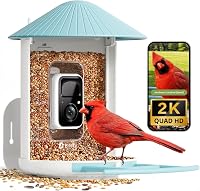
The Birdfy Feeder 1 pairs a 2K camera with a solar panel and a 5200mAh battery, and the app labels each visit with the species it recognizes. It's the model to shortlist when species ID is your main reason for buying a camera feeder.
NETVUE Birdfy Feeder 1 2K AI Camera: Best for AI species identification

- 2K AI camera
- Built-in solar panel
- 5200mAh battery
- 1.5 liter seed capacity
- Color night vision
The feeder that made AI birdwatching mainstream. The app recognizes thousands of species and organizes clips by date, and the AI features need a subscription.
Pros
- Solar panel and 5200mAh battery reduce charging chores
- AI recognizes about 11,000 species
- Free 30-day video history and 5GB cloud storage
- Weatherproof ABS body
Cons
- AI identification needs a paid subscription
- 2K video only, below 4K rivals
- Birdfy app stores most clips in the cloud
NETVUE launched the Birdfy 1 Series in 2022 and says the line is used by over 780,000 people. The app pulls more than 5 million bird videos a day from 174 countries.
Our score weighs specs, features and the fit with what a camera-feeder shopper wants.
The feeder also carries a 1.5 liter hopper and a weatherproof ABS body. NETVUE says the design went through three major upgrades since launch.
That history is part of the pitch: the app, the mount and the solar setup have all been refined around how people actually use a feeder. The package includes the smart feeder with its 2K camera; seed is not included.
Who the Birdfy Feeder 1 suits
It suits birders who want the app to identify visitors for them and who don't mind a monthly fee for that feature. The automatic recording and alerts are free, so the feeder still earns its place without the AI package.
The solar panel and long battery life mean less fuss for people who mount a feeder far from an outlet. Color night vision adds a second shift of visitors after dark.
If you mostly want to watch birds on a clear 4K screen, the Kiwibit AI model is the better fit.
It also suits households that want a shared view. The app allows more than 20 guests to watch live or replay clips at no cost, which turns a single feeder into something the whole family can follow.
People who live in apartments or rented homes should check the mounting options first, since wall, pole and tree mounts all need a spot the landlord allows.
The specs that matter in daily use
The 2K camera and the species database do the daily work, and the solar panel keeps the feeder running without a charger. The 1.5 liter hopper feeds a steady crowd between refills.
Video is 2K, which shows feather detail and color clearly on a phone or tablet. Color night vision records after dark without a harsh spotlight.
The AI names about 11,000 species, and the app sends an alert when a bird lands so you can watch live or replay the clip later. The camera is built for close-up framing of the perch.
The ABS body is built for weather and UV, and the feeder holds up through sun, rain, wind and snow. It measures 11.1 x 7.5 x 14.2 inches and weighs 3 pounds.
Mount it to a wall, pole or tree. The Wi-Fi connection is described as stable for outdoor use, which matters when the feeder hangs at the far end of a yard.
Battery life is the headline spec. The 5200mAh cell runs up to 6 months per charge, and the solar panel tops it up so you rarely think about charging.
That matters if your feeder hangs where a cable can't reach. Our guide to solar vs non-solar smart bird feeders explains when a panel is worth it.
The seed capacity and the target species list line up with a backyard crowd. Cardinals, finches, chickadees, blue jays, sparrows and nuthatches are all named, so the feeder is aimed at the common visitors most people see.
One feeder covers a typical yard without constant refilling.
Setting up the Birdfy Feeder 1
Setup starts with the 2.4GHz Wi-Fi network, because the feeder won't join 5GHz. Nearly all home routers broadcast a 2.4GHz band, including single, dual and tri-band models, so pick that network when the app asks.
Mount the feeder where the camera looks at the perch and the solar panel catches sun. A tree trunk or a pole both work.
Then fill the 1.5 liter hopper and pair the feeder with the Birdfy app.
The app guides you through pairing. Once connected, each visit records automatically and lands in the app by date.
You can invite more than 20 guests to watch live or replays at no cost, which makes the feeder a shared family view. If your Wi-Fi signal is weak at the mounting spot, move the feeder closer to the router before pairing.
Give the app notification permission on your phone and tablet. Without it, the alerts that make the feeder feel live never arrive.
Add the feeder to more than one device if several people in the house want to watch. The app is the control surface for everything, so it's worth spending a few minutes on its settings before the first bird shows up.
What the app does free and what costs money
Core features are free and AI ID is the paid upgrade. Automatic recording, instant alerts, live streaming, 30-day video history, 5GB cloud storage, saving photos and clips, and sharing all work without paying.
The AI package adds species recognition and the advanced features built on it. Bird Expert Joy answers bird questions in the app around the clock at no charge.
That's useful when you want to know what seed or feeder setup draws a particular species.
The free cloud storage holds your favorite clips; the app keeps every visit in the date-sorted history for 30 days. Downloaded clips are yours to keep.
If you want AI labels without a fee, skip to the Kiwibit AI feeder below.
The 5GB free tier is a collection space rather than an archive. It suits the clips you want to keep, while the 30-day history covers everything else.
People who want a permanent record of every visit should plan to download the clips they care about. That's the main gap in the free setup for anyone who treats the feeder as a long-term log of backyard life.
Care and placement for a camera feeder
Clean the feeder every couple of weeks so seed stays dry and mold doesn't build up. Empty the hopper, brush out shells and dust, and wipe the camera lens with a soft cloth so the AI gets a clean picture.
The solar panel needs direct sun. Move the feeder or angle the mount when shade creeps over the panel, and expect slower charging in winter.
The 5200mAh battery bridges cloudy stretches.
Place the feeder where birds have cover nearby and cats don't. A spot 6 to 10 feet from a shrub line gives birds a quick escape.
Keep the camera view free of branches that trigger motion alerts all day.
Check the mount after storms. A 3 pound feeder swinging in wind can loosen a strap.
Tighten fittings each season and bring the feeder in for a deep clean before winter.
Keep seed fresh and the feeder keeps working. Wet seed clumps, and the camera ends up pointed at a feeder birds stop visiting.
In heavy rain, check the hopper within a day or two and swap damp seed for dry. A small amount of seed changed often beats a full hopper left to sit.
The weatherproof body protects the electronics, not the seed, so the feeding habit still matters.
The trade-offs of the Birdfy Feeder 1
The subscription for AI ID is the main trade-off. Species labels are the reason many people want a camera feeder, and Birdfy charges for them.
Video tops out at 2K. A 4K camera feeder shows more detail when a bird sits close to the lens.
Our 2K vs 4K bird feeder camera comparison breaks down when the extra resolution helps.
Cloud storage is the default path. The free tier covers 30 days and 5GB, but people who want local files or long archives need to plan for that.
The Kiwibit models take a microSD card up to 512GB and keep a 1-day free cloud history.
None of these are dealbreakers. They just define who the feeder fits: people who want the most polished AI birdwatching app and don't mind paying for species ID.
The 2K ceiling in practice
The 2K resolution matters most when a bird sits close to the lens. At the perch, a 2K frame still shows feather color and eye detail.
The gap opens when you crop in on a clip or when a shy species stays at the edge of the frame. A 4K camera gives you more pixels to work with in those moments.
If your main joy is close-up portraits of cardinals and jays, 2K is enough. If you want to zoom into a distant branch or pull a still for printing, the extra resolution in the Kiwibit models earns its keep.
The Birdfy's strength is the app experience, not the raw pixel count.
Alternatives to the Birdfy Feeder 1
Kiwibit Smart Bird Feeder with 4K AI
The Kiwibit AI feeder is the best all-round pick here because it combines 4K video, 8MP photos and lifetime AI ID without a monthly fee. Its 132 degree lens and HDR night vision give you a wider, sharper view than the Birdfy's 2K camera.
The 3W solar panel tilts toward the sun and the 5200mAh battery carries it through gray days. It's IP65 rated for -4°F to 122°F.
Wi-Fi is 2.4GHz only, and you supply the microSD card if you want local storage. Its AI also filters false alarms from wind or leaves so the alerts you get are real bird activity.
Our Kiwibit bird feeder review covers the smaller model in the same family.
Kiwibit 4K 8MP Solar Bird Feeder
The Kiwibit 4K feeder gives you the same camera hardware for less money, with AI ID limited to a 30-day trial. Pick it when 4K live view matters more than species labels.
Its 5200mAh battery and 3W panel match the AI model's power setup. Up to 20 people can share recordings.
The trade-off is the trial ending: after 30 days, species ID stops unless you subscribe. The external solar panel is the practical difference.
It sits away from the feeder so you can aim it at the sun without moving the feeder itself. If you'd rather not pay later, the lifetime AI model above is the safer buy.
For the full picture of how the two brands stack up, read Birdfy vs FeatherSnap.
Verdict: buy the Birdfy or pick a Kiwibit?
Buy the NETVUE Birdfy Feeder 1 if you want the most established AI birdwatching app and you're happy to subscribe for species names. Its 2K camera, solar panel and long battery life make it an easy feeder to set up and forget, and the free tier covers the recording and sharing most people use daily.
Skip it if AI ID without a fee or 4K video matters more. The Kiwibit AI feeder scores highest here for its lifetime AI package and sharper camera.
The plain Kiwibit 4K model is the budget route to 4K video.
The final call comes down to how much you value species labels. If the app's ID is the fun part for you, the Birdfy is a sound choice at 8.2.
If you want the best picture and no future bill, go with the Kiwibit AI model.
Frequently asked questions
Does the Birdfy AI smart bird feeder need a subscription?
No for the basics. Automatic recording, instant alerts, live view, 30-day video history, 5GB of free cloud storage and sharing are all free.
AI bird recognition is the paid part, so budget for a subscription if species names are the reason you want this feeder.
What bird species can the Birdfy Feeder 1 identify?
Birdfy's AI covers about 11,000 species worldwide, according to AviList. The app sends a notification when a bird lands and labels the clip with the species it recognizes, so you get a running record of visitors without flipping through a field guide.
Does the Birdfy Feeder 1 work on 5GHz Wi-Fi?
No. It connects on 2.4GHz Wi-Fi.
Nearly all home routers broadcast a 2.4GHz network, including dual-band and tri-band models, so choose that network during setup.
A 5GHz-only network won't work with this feeder.
How long does the Birdfy Feeder 1 battery last?
Birdfy states up to 6 months of power per charge, with the 5200mAh battery topped up by the built-in solar panel. Real runtime depends on how much sun the panel gets and how many clips the camera records, so shade and winter light shorten the gap between charges.